
One iced Americano to go
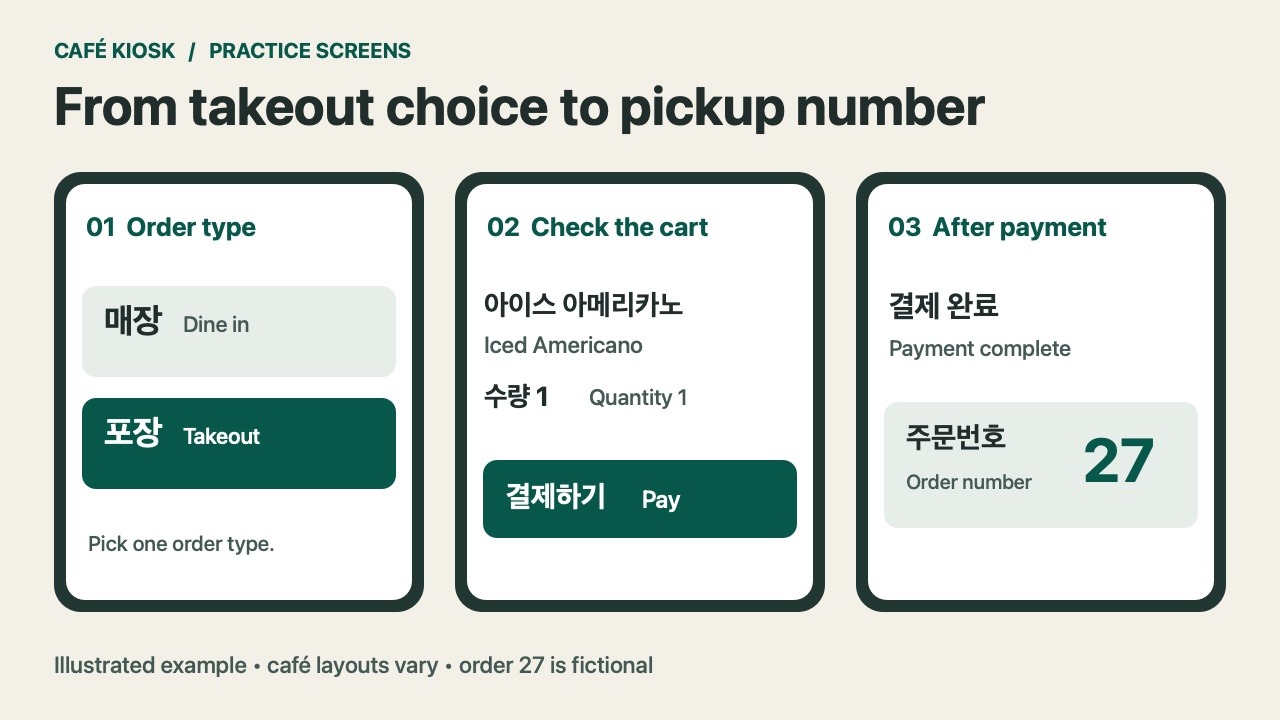
포장 (takeout) → 아메리카노 (Americano) → 아이스 (iced) → 수량 1 (quantity 1) → 결제하기 (pay) → 주문번호 (pickup number). For dine-in, choose 매장 when the option appears.
Payment and failed charges · Pickup number · Show a phrase to staff.
Use these Korean kiosk phrases to match the screen in front of you. The menu may come before the dine-in or takeout choice. The three practice screens below show where the key labels can appear.
On this page
1. Choose dine-in or takeout
On a start screen, the big choice may be where you’ll drink your coffee. 매장 by itself means the shop or premises. Paired with 포장 on an ordering screen, it means you’ll have the order there. You might see the longer label 매장 이용 (use the premises).
| On screen | What to do |
|---|---|
| 매장 / 매장 이용 | Choose this if you’ll drink or eat inside. |
| 포장 | Choose this to take your order away. |
| 주문하기 | Start ordering or continue, depending on the screen. |
If someone asks 매장에서 드세요? (“Are you having it here?”), 네, 매장에서 먹을게요 works for a snack or meal and 네, 매장에서 마실게요 for a drink. To take it away, say 포장해 주세요 (“To go, please”). If you change your mind after paying, ask the staff before placing another order.
Two documented ways the order can start
The Samsung Senior Digital Academy café simulator starts with 매장 and 포장. In that simulator, hot and iced coffee are separate menu categories, so you can choose the iced category before you select an Americano. Use this as a rehearsal for recognizing the labels on a full screen.
The August 2022 kiosk photo guide from Hanam City shows another sequence. The pictured interface lets you choose the food first, then shows dine-in and takeout during order confirmation. Its last photos show where to check the receipt for the order number. If the first screen has 주문하기, use that to start and watch for the order-type choice before paying.
Find the language setting before you build the cart
If the opening screen offers 언어, English, EN or a globe symbol, you can check the English view before you choose a drink. If only part of the interface changes, the Korean menu may still display temperature, required options and pickup status. Keep the short list of Korean kiosk phrases handy for those screens. Switch languages before adding items if you can. If you switch later, check whether your cart is still there.
2. Find a drink that’s available
Find a menu category such as 커피 (coffee), 음료 (drinks) or 디저트 (dessert). Then look for the actual product name, such as 아메리카노 (Americano) or 카페라테 (caffè latte). Café menus also commonly display 카페라떼 for the latter.
If a menu tile says 품절, the item is sold out. If a particular size is marked 품절, go back to the options and check whether another size is available. 준비 중 means something is being prepared or isn’t ready. Read it in context. On a pickup board it can describe your order’s progress.
To ask about a pictured item, point and say 이거 주문할 수 있어요? (“Can I order this?”). At a staffed counter, 아이스 아메리카노 한 잔 주세요 means “One iced Americano, please.” 한 잔 counts one cup or drink, and 두 잔 counts two. For more expressions you can use with staff, see the polite Korean guide for travelers.
3. Set temperature and options
After selecting a drink, check the temperature before moving to add-ons. A screen may use 아이스, ICE or ICED for cold and 핫, HOT or 따뜻한 for hot. Some drinks have only one temperature option. If you see 필수, make the required choice before looking for the continue button.
| Korean label | Meaning | Decision |
|---|---|---|
| 필수 | Required | Pick one of the available choices. |
| 선택 | Select or optional | Read the full label. By itself it can mean “select.” Paired with a required field, it can mark an optional choice. |
| 추가 | Add | Check whether the option adds a charge. |
| 샷 추가 | Extra espresso shot | Select it if you want an extra shot. |
| 시럽 빼기 | Leave out syrup | Use it if offered and you want no added syrup. Check what the drink already contains with staff if that matters to you. |
When ordering two drinks with different options, add them as separate items. For example, configure your iced Americano and add it once. Then open Americano again and configure a hot one. Raising 수량 (quantity) to two on the first line can give you two drinks with the same settings.
Read an option group before touching the price
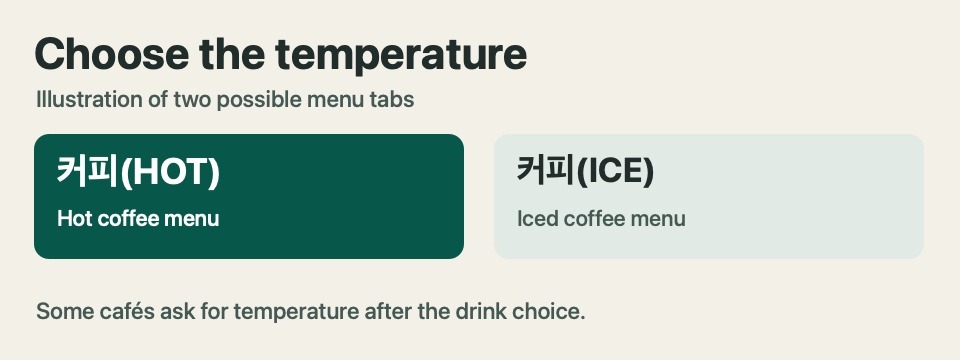
You tapped a latte and now see three Korean kiosk phrases together: 온도 선택 (choose the temperature), 필수 (required) and 추가 옵션 (extra options). First make the temperature choice. Then scan the extra options for any selected items. If you meant to order the standard drink, leave optional extras off and use 담기 to add it to the cart.
When 기본 appears next to a size, it means the default size for that drink on that screen. Look at the size labels themselves if you need a specific cup size. A label such as 사이즈 변경 may open another menu, where you can check both the size name and any price difference.
4. Review the cart
Look for 장바구니 (cart), 담기 (add to cart) or 주문 내역 (order summary). Before you pay, read the item names and quantities on each line. Confirm the temperature, add-ons and whether your order is dine-in or takeout. Then check 합계 (total) or 결제 금액 (amount to pay).
If you see an unwanted item, look for 삭제 (remove) on that line or a minus button by its quantity. Read the next screen before confirming 취소 (cancel). Depending on the screen, it can cancel an option, a payment attempt or the whole order. If you want to keep the rest of your cart, look for a control on the specific line.
Try reading the cart in this order: “one iced drink, one hot drink, two drinks total, takeout.” This catches the easy mistake of seeing the correct total but missing that both drinks have the same temperature.
A cart check for two different drinks
Suppose your group wants one hot latte and one iced Americano. Look for one line with 핫 or HOT next to the latte and a separate line with 아이스 or ICED next to the Americano. Each line should show 수량 1. If you see one drink with quantity two, return to the item list and add the missing drink as a new line. On some screens an extra shot is nested below its drink name.
If a side or size is already selected, read its label and price before you advance. A number such as +500원 next to a choice describes an added charge. Compare the final amount with the cart you just reviewed. If you see a price you cannot account for, show staff the cart before starting payment.
5. Follow the payment prompts
Select 결제하기 (pay) when the cart is correct. Follow the prompt on the screen or card reader. 카드 결제 means card payment. The specific reader may ask you to insert or tap your card. Look at the reader before removing an inserted card and wait for confirmation.
| Payment message | What it tells you |
|---|---|
| 결제 중 | Payment is in progress. Wait for the result. |
| 결제 완료 | The kiosk reports payment complete. Look for your order number. |
| 결제 실패 | The kiosk reports payment failed. If the screen and your card notification disagree, ask staff to check before paying again. |
| 영수증 출력 | Print a receipt if the kiosk offers the choice. |
If neither the confirmation screen nor a receipt appears, you can ask 결제됐는지 확인해 주실 수 있어요? (“Could you check whether the payment went through?”). You can show the cart amount and mention the approximate time. Staff can tell you what information they need to find the order.
What to show staff when payment is unclear
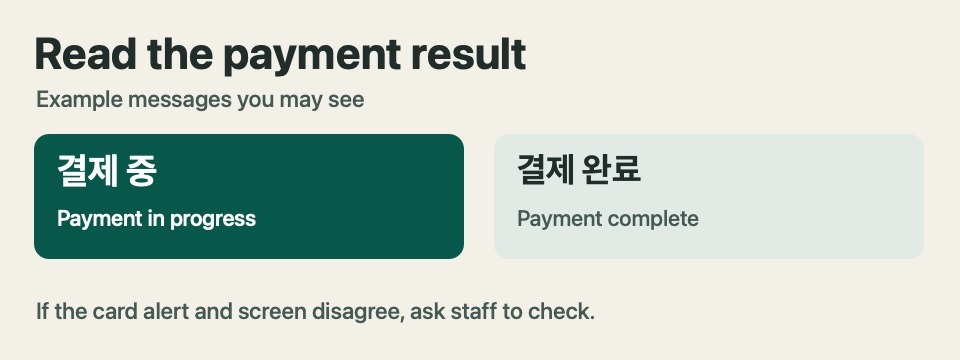
A bank alert and the kiosk screen answer different questions. The alert shows activity on your card. The counter can check whether this kiosk created an order. If you have a payment notification but no order number, ask staff to check before trying again. Point out the kiosk you used, give the approximate time and amount, and show any receipt or order confirmation you have.
You can show this sentence on your phone: 카드 알림은 왔는데 주문번호가 안 나왔어요. “I got a card notification, but I didn’t get an order number.” If the kiosk is still processing, wait for it to finish or ask staff. If staff confirm the order went through, ask where to pick it up.
6. Find your pickup number
Look for 주문번호 (order number) on the final screen or receipt. A small number near the top of a printed ticket may be your pickup number, but receipts can include several other numbers. Find the label before memorizing the digits. The café may call out orders or use a display.
If the display separates 준비 중 (being prepared) and 준비 완료 or 픽업 가능 (ready for pickup), look for your number in the ready section. You may also hear a number followed by 번. For instance, 이십칠 번 means “number twenty-seven.” If you miss the announcement, show the ticket and ask 이 번호 나왔어요? (“Is this number ready?”).
At pickup, compare the drinks with the order you checked on screen. For a swap such as hot instead of iced, point to the line on your receipt and say 아이스로 주문했어요 (“I ordered it iced”). For more language practice with everyday menus, see the Korean BBQ ordering scripts.
Read a receipt without memorizing every number
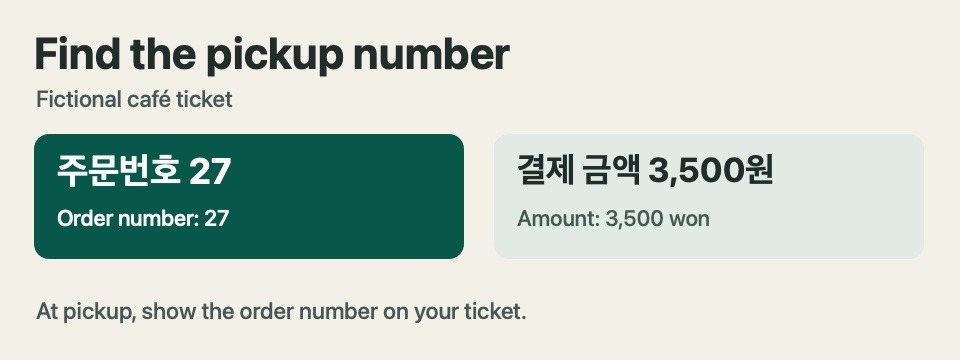
In a sample receipt, 결제 금액 3,500원 identifies the amount, 주문번호 27 identifies the pickup ticket, and 승인번호 is a card approval reference. When staff ask for your order at the counter, point to the line headed 주문번호. A receipt layout can differ, so use the Korean kiosk phrases beside the digits to identify each number.
If the screen shows 주문번호 for only a moment, look for that same label on your ticket. If there is no ticket and the order number disappeared, ask staff where to wait and how they identify drinks. Keep your place in the pickup area only after you know what signal you’re waiting for.
7. Ask for help when you get stuck
When a screen stalls, the most useful Korean kiosk phrases are short requests you can show alongside the screen. 주문을 도와주실 수 있어요? means “Could you help me order?” If the screen is already showing payment or pickup information, show it before canceling or starting again.
- 이거 어디서 선택해요? — Where do I select this?
- 포장으로 바꿀 수 있어요? — Can I change it to takeout?
- 주문번호가 어디에 있어요? — Where is the order number?
- 카드 결제가 안 돼요 — The card payment isn’t working.
If you have an allergy or another ingredient restriction, confirm the ingredient and preparation details with staff before paying. A customization button usually describes what the kiosk can send to the barista. Ask whether staff can verify the information you need for that drink.
Three Korean kiosk phrases you can show staff
포장해 주세요. (Pojanghae juseyo.) — To go, please.
주문을 도와주실 수 있어요? (Jumuneul dowajusil su isseoyo?) — Could you help me order?
이 번호 나왔어요? (I beonho nawasseoyo?) — Is this number ready? Show the ticket when you ask.
If a screen offers English, check whether the menu, options and pickup message are all translated. Save these Korean kiosk phrases where you can open them quickly. If you need help mid-order, show the sentence alongside the screen so staff can see which step you reached.
Practice with a sample order
Imagine you want one iced Americano to go. Read the Korean kiosk phrases and pick the buttons you would press before looking at the answer. The order number is fictional and supplies a target to look for.
- Start screen: 매장 or 포장.
- Menu: 아메리카노 or 바닐라 라테.
- Temperature: 아이스 or 핫.
- Cart: 수량 1 or 수량 2.
- Final screen: 주문번호 27 and 결제 금액 3,500원. Which number do you use at pickup?
Check your answers
Choose 포장 → 아메리카노 → 아이스 → 수량 1. At pickup, use order number 27. The 3,500 won is the fictional payment amount.
Now change only one detail. Order the same drink hot or switch to dine-in, then say which label changed. To practice with a companion, have them call out 이십칠 번 and show the number you’d hand to staff.
Korean Kiosk Phrases for When the Screen Changes
A kiosk can jump from the menu to a pop-up without warning. If a window has 확인 and 취소, those usually mean “confirm” and “cancel.” Read the message above them before tapping. 이전 generally goes back one screen, while 처음으로 returns to the beginning and may clear the current order. To change a drink you already added, use the cart when possible.
Here are three Korean kiosk phrases that can look similar when you’re in a hurry. 주문하기 starts or continues an order. 결제하기 opens the payment step. 주문 완료 tells you the ordering process is complete. When the machine still displays your cart, look for the next action. When it displays an order number, use that number to wait for pickup.
If you’re practicing Korean kiosk phrases before a trip, learn a pair at a time. Cover the translations and point to 포장 for to-go, then switch to 매장 for dine-in. Next, explain what you would do if the screen changed to 결제 실패. This rehearses an action for each label and takes less than a minute.
Try a second order with a recovery step
Start an imaginary order for two hot Americanos to drink inside. The first menu opens with 주문하기, so choose that and select two hot drinks. At the confirmation step, choose 매장. Now suppose you spot 수량 3 in the cart. Practice using the minus button on the Americano line, then read the new quantity out loud. The Korean kiosk phrases in this exercise tell you when to check the cart as well as what to tap.
Add one more variation. When 품절 replaces the drink you were going to choose, go back to the menu and pick an available drink. If you’re helping a travel companion learn these Korean kiosk phrases, have them say what changed on screen before looking up the English meaning. End by identifying the order number on an example ticket.
Look up unfamiliar labels
The National Institute of Korean Language’s Korean–English Learners’ Dictionary is a useful reference for unfamiliar vocabulary and pronunciation. Try searching 포장, 품절 or 결제 as standalone words. This guide translates short labels as they are used in the café-ordering context. For help reading the letters themselves, see the beginner guide to Hangeul.