
Digital Life in South Korea
How Identity Verification Online in Korea
Creates Unexpected Friction for Foreigners
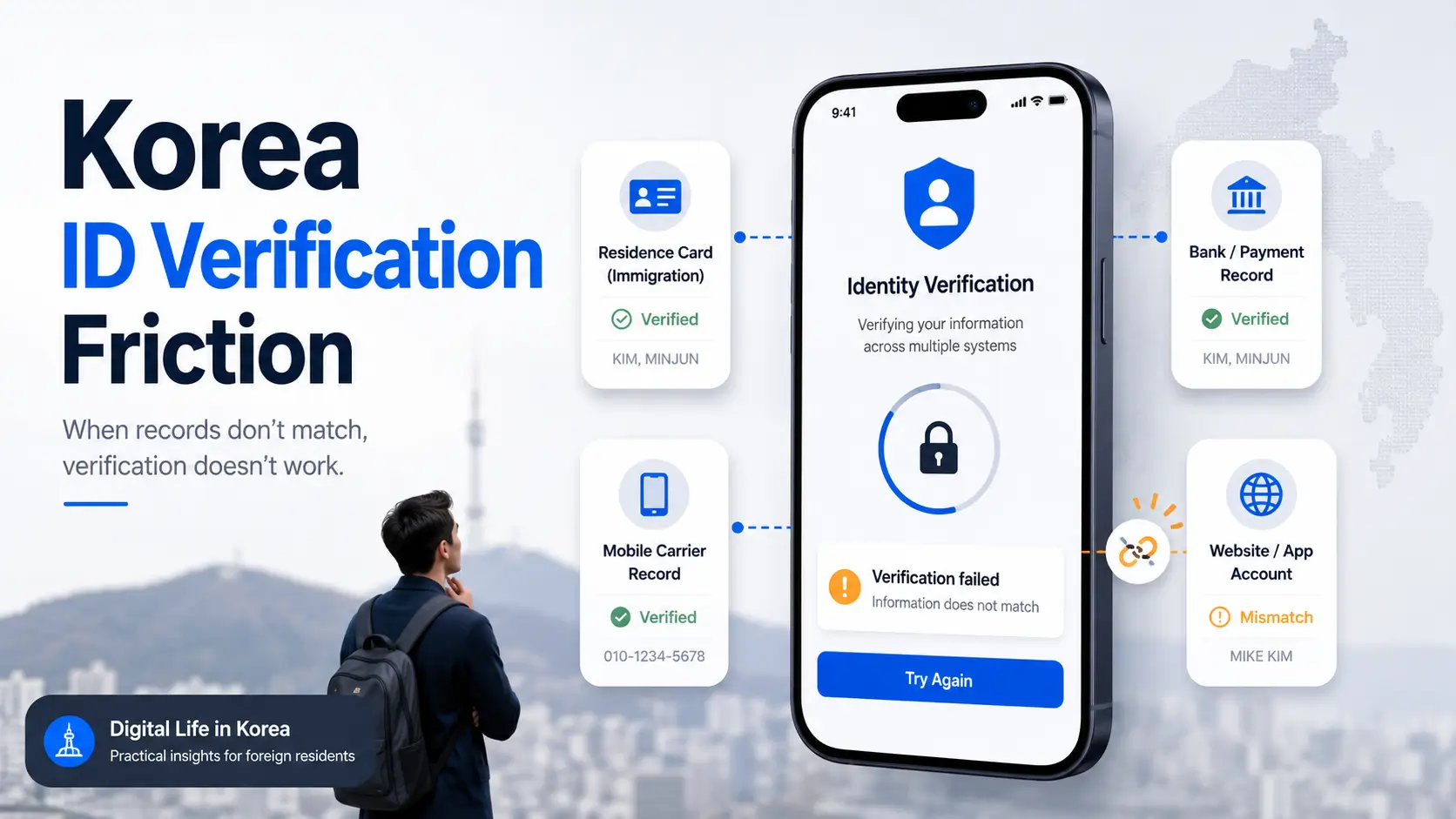
You have a valid residence card, a Korean phone number, a local bank account, and a perfectly ordinary name. Yet a shopping app insists that you do not exist. A payment page rejects information that worked five minutes earlier. Customer support asks you to type your name “correctly,” as though you misplaced a vowel somewhere between immigration and checkout.
The difficulty is rarely one dramatic rule. It is usually a quiet disagreement between several databases: immigration records, mobile subscriber information, bank records, identity-verification providers, and the website or app requesting confirmation. Each system may be working as designed while the person standing between them remains locked outside.
This guide explains where the chain breaks, how to identify the authoritative record, which troubleshooting steps save time, and when a tourist, student, employee, spouse, remote worker, or small business owner may need a different route altogether. The goal is not to make you memorize every Korean authentication system. It is to help you stop guessing.
Find the mismatch
Trace your name and identity data across immigration, telecom, banking, and the platform.
Avoid bad workarounds
Protect account ownership instead of borrowing someone else’s identity or creating duplicates.
Choose the next call
Know whether to contact immigration, your carrier, your bank, or the platform itself.
🔐 The useful question is not “Why does Korea reject foreigners?” It is “Which record stopped matching, and who controls it?”
Article snapshot
This guide is for foreign residents, international students, workers, spouses, overseas Koreans, remote professionals, and visitors who cannot complete Korean online identity verification. You will learn how the identity chain works, how to diagnose common errors, and how to prepare a one-page record before contacting support.
Table of Contents
The Verification Loop: Why One Signup Can Require Four Matching Systems
Korean online identity verification often feels like a single checkpoint because the website presents one small form. Enter your name, mobile number, date of birth or foreign resident registration number, choose a carrier, and wait for a code. Neat. Minimal. Deceptively calm.
Behind that form, however, several organizations may be involved. The platform sends a request to an identity-verification provider. That provider checks information associated with the mobile subscription or another approved credential. The submitted data may need to correspond with a government-issued resident identity, while a payment or financial service may run additional checks against bank records.
A failure can therefore occur even when every piece of information looks correct to you. The system is not reading your intention. It is comparing fields, character strings, account types, eligibility flags, and sometimes the current status of recently updated records.
Korean digital identity works as an interconnected chain
Think of the process as four locked doors arranged in a corridor. Your residence record opens the first. Your mobile subscriber record opens the second. A bank or payment profile may open the third. The website’s own eligibility rules open the fourth.
You do not necessarily pass because three doors opened. The fourth door does not care that the others were impressed.
- Government identity record: your registered name, nationality, identity number, status, and validity period.
- Telecom subscriber record: the person legally associated with the mobile number and the way that person’s name is stored.
- Financial record: the name and identity information attached to a bank account, card, wallet, or payment service.
- Platform account: the profile name, account category, age requirements, nationality support, and technical integration used by the website or app.
Not every service checks every layer. A news subscription may need only an email address and card. A local marketplace may require phone authentication. A bank, government portal, or digital wallet may apply a thicker stack of identity checks.
“Verified” in one system may mean nothing in another
Passing verification on one app does not create a universal digital passport. Each service chooses its own provider, matching rules, permitted identity categories, and fallback options. One app may accept a foreign resident with a standard postpaid phone plan. Another may technically support foreign residents but fail on a long name. A third may allow signup but restrict a specific payment or age-verified feature.
This explains a common and deeply irritating pattern: your banking app works, your government login works, and your food-delivery account refuses to authenticate. The successful services prove that your identity exists. They do not prove that the failing service can process it.
Key takeaway
Treat verification as a chain of records, not a spelling quiz. Before changing what you type, identify which organization owns the data being checked.
The identity chain at a glance
The four-record verification chain
1. Immigration
Legal name, resident category, identity number, validity, nationality.
2. Mobile carrier
Subscriber name, account ownership, plan type, authentication eligibility.
3. Bank or payment
Account holder, cardholder, wallet profile, financial compliance checks.
4. Website or app
Supported users, field limits, vendor integration, service-specific restrictions.
Failure rule: one mismatch, unsupported account type, stale update, or poorly designed form can interrupt the entire sequence.
The Name-Matching Trap: Where Foreign Names Quietly Break the Form
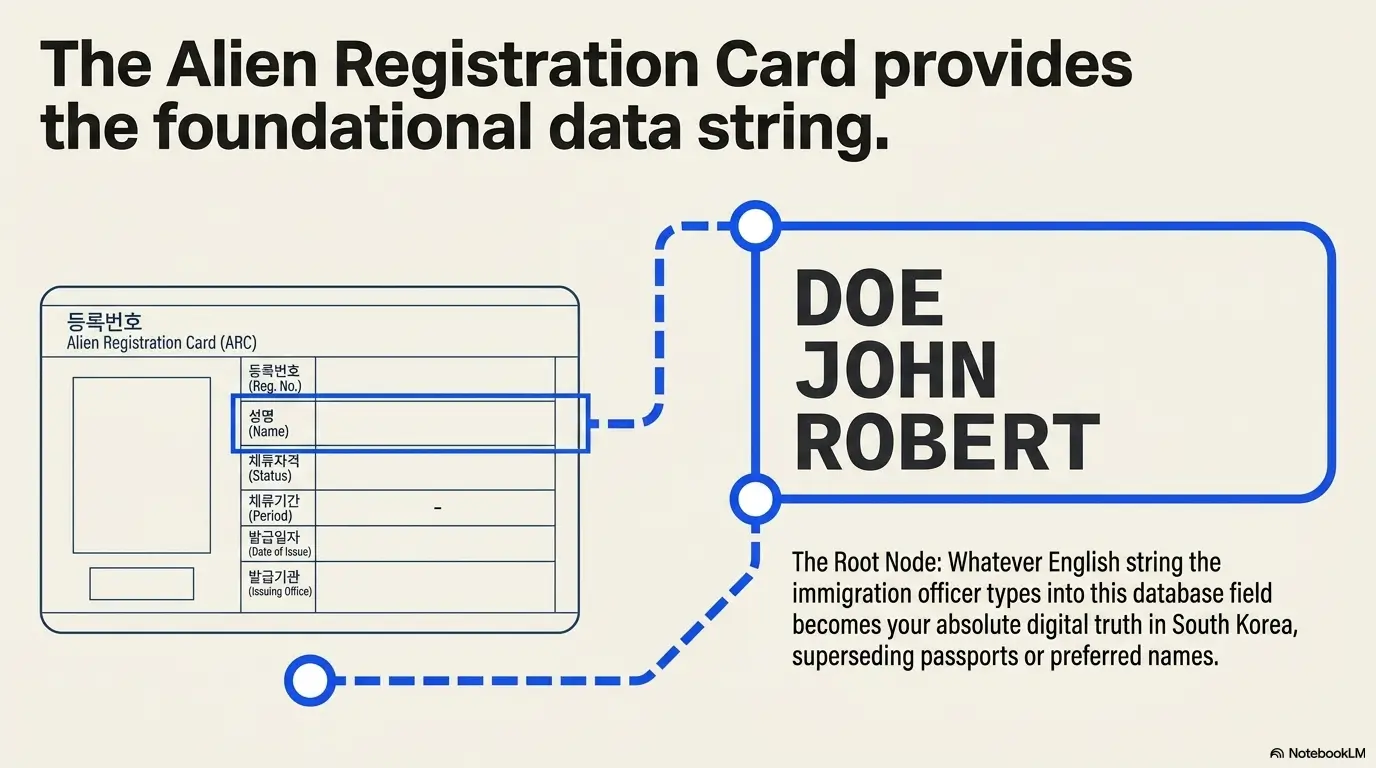
Foreign names create trouble not because they are inherently complicated, but because databases must decide how to divide, order, shorten, and display them. Korean names commonly fit a compact family-name-plus-given-name structure. International names may contain several given names, compound surnames, apostrophes, hyphens, suffixes, particles, or spaces that different systems treat differently.
A human clerk can glance at two versions and recognize the same person. Software may see two unrelated strings wearing similar coats.
Name order, spaces, hyphens, and middle names are data
Suppose a person’s passport reads “EMILY ROSE CARTER.” A residence record may store the name in the same sequence, while a telecom shop enters “CARTER EMILY ROSE.” A banking profile may omit the middle name because the display field is short. A website may ask separately for surname and given name, then rebuild the name in another order before sending it for authentication.
All four versions look reasonable. Only one may match the record used by the verification request.
| Visible version | Possible hidden problem | Best first check |
|---|---|---|
| EMILY ROSE CARTER | Carrier stored surname first | Ask the carrier to read the registered subscriber name exactly |
| CARTER EMILY ROSE | Platform separates family and given names incorrectly | Confirm the platform’s accepted name order |
| EMILY CARTER | Middle name omitted from one record | Compare immigration and telecom records |
| ANNA-MARIE LEE | Hyphen removed or replaced by a space | Check punctuation in the source record |
| DE LA CRUZ MIGUEL | Compound surname split or truncated | Ask whether the form has a character limit |
Capital letters may also matter in a strict character comparison, even though many systems normalize case. Do not assume normalization. Record the capitalization that appears in each authoritative system, especially when support staff ask for a screenshot or exact transcription.
Why copying the passport can still produce an error
Your passport is a primary identity document, but the service may not be querying passport data. It may be checking the identity attached to your Korean mobile subscription, which may have been registered from your residence card. If the carrier’s record differs from the passport display, typing the passport version may be technically accurate and operationally useless.
The correct question is therefore not “What is my real name?” You know that part. Ask, “Which exact name string is this verification provider comparing?”
Use a controlled name test instead of frantic variations
Trying twenty name formats feels productive because something is happening. It also destroys your ability to learn from the failure. You may trigger rate limits, temporary locks, or duplicate-account problems without discovering which record is wrong.
- Write down the name exactly as shown on your current residence card or official resident record.
- Ask your mobile carrier to confirm the exact subscriber name, including spaces and punctuation.
- Check the name attached to the relevant bank account or card.
- Enter only the format requested by the platform.
- Record the result, date, time, device, and error message.
- Change one variable at a time only when support provides a reason.
Key takeaway
Do not “simplify” your name with a nickname, omitted middle name, or guessed order unless the organization controlling the source record confirms that format.
Short Story: The Space That Ate a Saturday
Maya had used her Korean phone for months. Banking worked. Messages arrived. Her delivery app worked too, until she tried to activate a payment wallet and received the same gray error box six times.
She removed her middle name, reversed her name, added a hyphen, deleted the hyphen, and opened a second account. By lunchtime, the app had temporarily restricted further attempts.
On Monday, her carrier read the subscriber record aloud. The shop had entered two given names without the space shown on her residence card. The correction itself was unremarkable. The wasted weekend was not.
The lesson was small and durable: when a system compares identity records, creativity is not a troubleshooting method. Maya stopped inventing formats, corrected the source record, and kept a note of the exact version used by immigration, telecom, and her bank.
Phone Verification Is Not Just a Text Message
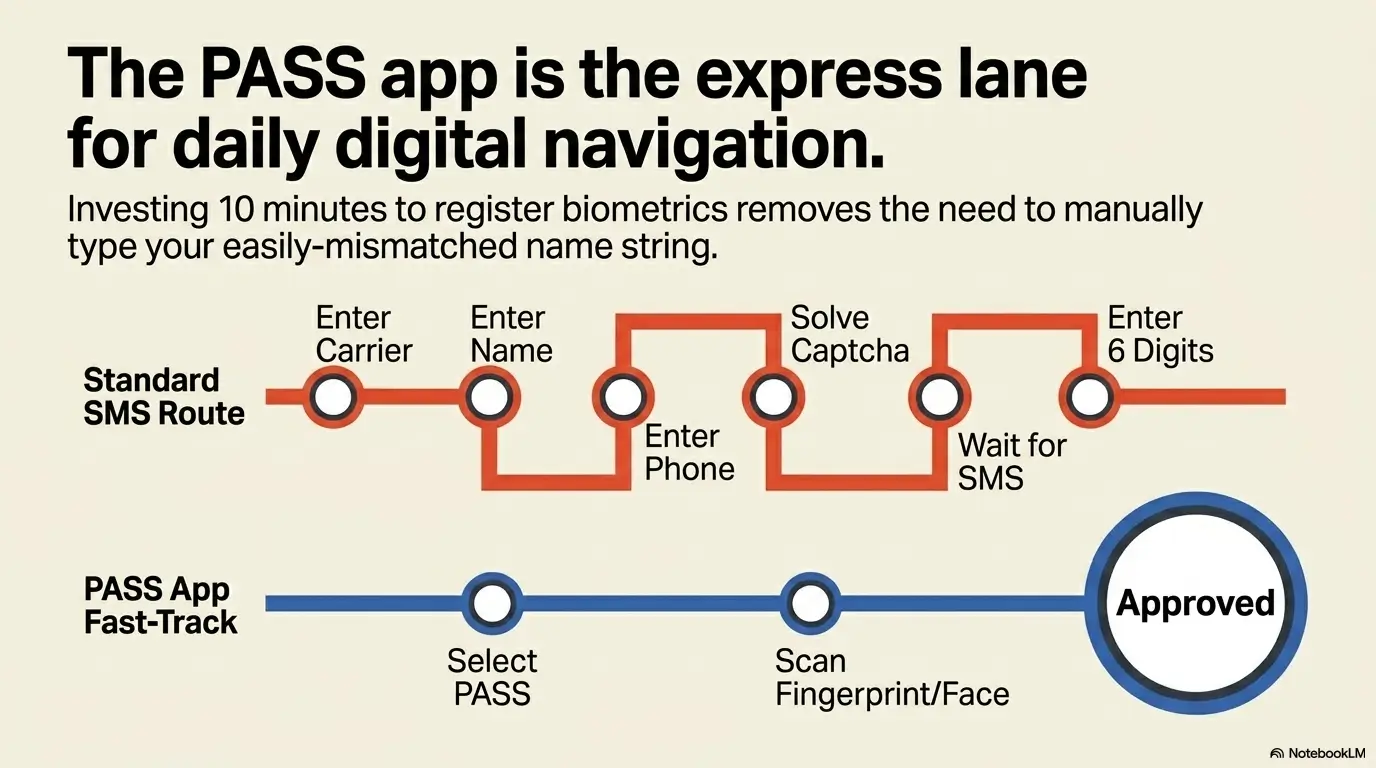
Many newcomers assume mobile verification proves only that the phone is in their hand. That is understandable. A code arrives by text, so the process resembles ordinary two-factor authentication.
In many Korean services, however, mobile identity authentication does more than confirm possession. It may also check the subscriber’s identity information, carrier, date of birth or resident number, account ownership, and whether the plan is eligible for the requested authentication method.
Possession of the phone and ownership of the line are different
You may pay for a phone, carry it every day, and receive every text sent to it without being the registered subscriber. The line might be held under an employer, spouse, parent, university, company, or previous account holder.
That distinction matters because an identity-verification request may return the subscriber’s data, not the identity of the person holding the device. If those are different people, the process should fail. From a security perspective, that is the sensible outcome, even when it feels spectacularly inconvenient at 11:47 p.m. during checkout.
Prepaid, tourist, corporate, and low-cost plans may behave differently
Do not assume that every SIM card capable of receiving texts supports resident-level identity authentication. Tourist SIMs and short-term data products are often designed for connectivity, not for creating a durable Korean digital identity. Some prepaid plans may support certain functions but not others. Corporate accounts may identify the company rather than the employee. Low-cost mobile providers can work well, but the available authentication route may depend on the provider, plan, activation process, and how the subscriber was registered.
Before buying or changing a plan, ask a narrow question: “Can this specific plan perform mobile identity verification for a foreign resident using a Korean residence card?” That is much better than asking whether it can receive verification texts. Almost any active phone can receive a code. The identity check is the hidden machinery.
Readers choosing service for the first time may also find the practical distinctions in this guide to Korean phone plans for Americans useful, especially when comparing short-term connectivity with a resident account intended for banking and local apps.
What to ask your mobile carrier
- Is this number registered in my own name?
- What exact English name is stored in the subscriber record?
- Are spaces, hyphens, and middle names included?
- Is my foreign resident registration number attached correctly?
- Is the account categorized as personal, corporate, prepaid, or another type?
- Does this plan support mobile identity authentication for foreign residents?
- Was the account recently changed, transferred, renewed, or migrated?
- After a correction, how long should I wait before testing again?
Ask the representative to inspect the subscriber identity, not merely confirm that the phone number is active. “The line is working” answers a different question.
Key takeaway
A phone number is not automatically an identity credential. Confirm the legal subscriber, exact registered name, account type, and authentication eligibility.
Residence Card, Passport, or Mobile ID: Which Identity Does the Website Want?
Korean interfaces use several labels for foreign-resident identity. You may encounter “foreigner registration number,” “alien registration number,” “foreign resident number,” “residence card,” or older references to an ARC. The terminology can vary by translation, institution, and the age of the interface.
The practical issue is not the English label alone. It is whether the service accepts your identity category and can communicate with the relevant verification system.
A passport proves identity but may not unlock resident services
A passport is widely used for travel, hotel check-in, immigration procedures, and certain in-person transactions. Yet many Korean online services are built around a resident identity number and a locally registered mobile account. A passport number may not fit the field, may not be connected to a telecom identity profile, or may be accepted only through a separate manual process.
This creates an awkward period for newly arrived long-term residents. You may hold a valid visa and have every legal right to remain, but still lack the residence card, resident number, bank setup, or phone registration needed for ordinary digital tasks.
The residence card may appear under several labels
Do not abandon a form merely because it does not use the phrase printed in your favorite expat guide. Look for a foreign-resident option, a nationality selector, or a separate authentication tab. Older websites may still use legacy English terminology even when the current physical document is called a residence card.
When a site offers only “Korean citizen” and no foreign-resident path, the omission may reflect a platform limitation. Do not squeeze your information into a citizen-only flow. A successful-looking submission under the wrong identity category can create a more complicated problem later.
Mobile residence cards add an option, not universal compatibility
Korea has introduced mobile residence-card functionality, giving eligible foreign residents another way to present or confirm identity in supported settings. That is a meaningful improvement, but it does not guarantee that every private website, payment gateway, bank workflow, or legacy app can use the mobile credential.
Digital identity tools arrive unevenly. Government systems, major financial institutions, telecom providers, and smaller commercial platforms do not all update on the same afternoon. Keep the physical document available when completing important in-person corrections or when a support desk asks to inspect the original card.
Show me the nerdy details
An online form may collect your name and identity number, but the platform does not necessarily decide whether they match. It may pass the fields to a contracted verification provider, which then queries or compares records available through an approved identity channel.
Before the comparison, software may normalize some characters by changing case, removing spaces, or converting punctuation. Another system may preserve those characters exactly. A long name can also be shortened in a display field while remaining complete in a hidden record, making screenshots surprisingly unhelpful.
This is why two services using “phone verification” can return different outcomes. Their providers, integrations, normalization rules, supported identity categories, and error handling may differ.
Who This Is For, and Who May Need a Different Route
The phrase “foreigner in Korea” covers people with very different legal status, documentation, time horizons, and access to local infrastructure. Advice that works for a long-term employee with a residence card and postpaid phone may be useless to a tourist staying nine days.
Before troubleshooting, identify which group you are in. This prevents you from spending hours trying to unlock a resident-only service that was never designed for your current status.
People most likely to use the resident verification route
- Foreign residents with a valid Korean residence card and resident number
- International students staying under a qualifying long-term status
- Employees registered with a personal Korean mobile account
- Spouses and family members with resident documentation
- Foreign business owners who maintain personal and company identities separately
- Long-term remote professionals with the appropriate immigration status and local accounts
These users may reasonably expect access to many resident services, but the expectation still depends on account type, platform support, current records, and any service-specific eligibility rules.
Overseas Koreans and dual nationals may face a category problem
Someone with Korean heritage, a former Korean identity, dual nationality, overseas Korean status, or a name that appears differently across countries may encounter a problem that looks like foreign-resident verification but is actually an identity-category issue.
Do not assume that the “foreigner” tab is correct merely because you normally use a non-Korean passport. Equally, do not select a Korean-citizen route without documentation that supports it. Ask the responsible agency or service which identity category applies to the exact transaction.
Tourists should look for guest, international, or offline routes
Short-term travelers may be unable to use services that require a resident identity number, resident-authenticated phone, or local financial account. That is not always a technical fault. It may be the boundary of the product.
Useful alternatives can include guest checkout, an international card, a foreigner-friendly booking page, hotel assistance, in-person purchase, bank transfer through an eligible account, or a global version of the service. For transport, shopping, and daily life, it is wise to distinguish between “requires a Korean phone number” and “requires Korean resident identity verification.”
| User situation | Most realistic route | Common wrong assumption |
|---|---|---|
| Long-term resident with card and personal phone | Resident mobile identity verification | Any spelling close to the passport will work |
| New arrival awaiting residence card | Temporary, manual, in-person, or international option | A visa alone activates resident services |
| Tourist with data SIM | Guest or international checkout | Receiving texts means identity authentication is available |
| Employee using a company phone | Personal line or employer-supported business process | The person holding the phone is the registered subscriber |
| Overseas Korean or dual national | Confirm the legally applicable identity category | The foreigner route is always correct |
Key takeaway
First determine whether you are eligible for the resident verification route. A perfect name match cannot unlock a service that does not support your identity category.
The Error Message Decoy: What the Screen Says Versus What Failed
“Information does not match” sounds specific. It is not. It may indicate a name mismatch, a resident-number mismatch, an unsupported carrier, an ineligible plan, a temporary connection failure, a blocked request, an outdated app, or a platform that cannot process your identity category.
The error message is often the least useful person in the room. It has one sentence and refuses follow-up questions.
One generic message may cover several unrelated causes
| Error wording | Possible underlying cause | Useful evidence to collect |
|---|---|---|
| Information does not match | Name, number, date, carrier, or subscriber mismatch | Exact fields entered and carrier record |
| Invalid foreigner number | Wrong digits, status timing, unsupported path, stale update | Card validity and recent immigration changes |
| Unable to authenticate | Provider outage, blocked plan, app error, unsupported user | Error code, time, device, browser, carrier |
| Try again later | Rate limit, temporary outage, maintenance, vague fallback message | Number of attempts and time of first failure |
| Service unavailable | Network, vendor, platform, or maintenance problem | Whether another device or channel works |
Do not tell support merely that “it does not work.” Give them a reproducible event: the service, feature, date, local time, device, operating system, browser or app version, carrier, identity option selected, and exact error code.
Separate account creation, identity verification, and payment
These are different stages. You may create an account successfully but fail identity verification. You may verify identity but fail to add a card. You may add a card but fail a transaction because the merchant, payment gateway, card issuer, or fraud system rejects it.
When troubleshooting, identify the exact stage that failed. Saying “the app rejected my card” is inaccurate when the app never reached the card screen because mobile identity verification failed.
Use technical tests to isolate, not to guess
- Update the app and operating system.
- Try the official website if the app fails, or the app if the website fails.
- Disable aggressive content blockers for the test.
- Allow pop-ups when the verification provider opens a separate window.
- Check whether the carrier or identity provider reports maintenance.
- Switch between Wi-Fi and mobile data once to rule out a local network issue.
- Do not use a VPN during identity checks unless the official service specifically allows it.
- Stop after a small number of controlled attempts to avoid temporary restrictions.
A technical test is useful only when you record the outcome. Randomly hopping between devices, browsers, and name spellings creates a fog bank where evidence used to be.
Mistake checklist: stop making the puzzle larger
- Do not create multiple accounts before confirming the required identity format.
- Do not alternate between nicknames and legal names without a record of each attempt.
- Do not assume the passport version overrides the telecom subscriber record.
- Do not ask a friend to authenticate an account intended to belong to you.
- Do not send full identity numbers through ordinary email or public chat.
- Do not keep retrying after a rate-limit or security warning appears.
Timing Gaps and the Services Where Verification Friction Hurts Most
Correct information can still fail when it is new. A renewed card, updated visa status, corrected legal name, transferred phone number, newly opened bank account, or recently changed carrier may not appear consistently across every connected system at once.
Digital systems create the impression that updates travel at light speed. Administrative data often moves more like luggage through a large airport: usually forward, occasionally delayed, and sometimes waiting on the wrong carousel.
Life changes that commonly create temporary mismatches
- Receiving a first residence card
- Renewing or replacing a residence card
- Changing visa or residence status
- Updating a legal name or passport
- Changing nationality records
- Opening a new bank account
- Transferring a mobile number to another carrier
- Changing from a company line to a personal line
- Correcting a misspelled subscriber name
- Replacing an expired identity document
After a change, ask the responsible institution when the correction becomes effective for external verification. “Updated in our system” may mean the front-desk database changed immediately while a downstream service updates later.
Banking, payments, government access, and everyday apps
Verification failure becomes more than an annoyance when it blocks a bank login, mobile banking activation, government document, tax process, health-insurance task, housing application, ticket purchase, age-restricted service, or business account.
For government-related tasks, a local district office may be an important practical bridge when an online route fails or when records need correction. The guide to local district offices in Korea explains what these offices do and why the correct office can save a long chain of phone calls.
Foreign residents dealing with health-related administration should also keep identity records consistent across immigration, telecom, and insurance services. This overview of Korean National Health Insurance for foreigners provides related context for navigating resident services.
A foreign-issued card can solve payment but not identity
A merchant may accept an international credit card while still requiring Korean identity verification to create the account, confirm age, access a regulated feature, prevent resale, or comply with internal fraud controls. Payment credentials and identity credentials answer different questions.
Conversely, you may verify your identity successfully and still have a foreign card rejected by the payment gateway. Diagnose the stage before changing the tool.
Key takeaway
After a renewal, correction, carrier transfer, or new account opening, treat timing as a possible cause. Confirm when external verification systems should recognize the update.
A Better Troubleshooting Order: Check the Identity Chain Before Calling Everyone
The fastest route is not always the first support number you can find. It is the organization most likely to control the mismatched record.
Use the following sequence. It moves from authoritative identity data toward the service displaying the error, while preserving enough evidence to make each conversation useful.
The six-step verification plan
- Confirm your current identity record. Check your valid residence document, registered name, identity number, expiration date, and any recent changes.
- Confirm the mobile subscriber record. Ask for the exact name, identity number association, account owner, plan category, and authentication eligibility.
- Check the service’s foreign-resident support. Look for a foreigner option, accepted document list, manual process, and known limits.
- Test one alternate official channel. Compare website and app, or desktop and mobile, without changing your identity data.
- Capture the failure. Save the error code, screenshot, date, local time, account email, and sequence of steps.
- Contact the owner of the likely mismatch. Immigration for resident data, the carrier for subscriber data, the bank for account-holder data, or the platform for unsupported integration and manual review.
Who controls which part of the record?
| Problem clue | Start here | What to request |
|---|---|---|
| Residence number or legal status appears wrong | Immigration or relevant government office | Confirmation or correction of the official resident record |
| Phone verification fails across several unrelated services | Mobile carrier | Exact subscriber identity and authentication eligibility |
| Only one bank or wallet fails | Financial institution | Account-holder record and foreign-resident support |
| Only one commercial app fails | Platform support | Accepted identity category, vendor, name format, and manual option |
| Failure began immediately after a major update | Institution that processed the update | Effective date and downstream synchronization timing |
A support script that produces better answers
Vague questions tend to attract vague replies. Use a compact request that separates eligibility, data format, and technical failure:
Support message template
I am a foreign resident with a valid Korean residence card and a mobile number registered in my own name. I am trying to complete identity verification for [feature or service].
The attempt failed on [date and time] with the message or code: [exact wording]. My carrier is [carrier], and I selected the foreign-resident verification option.
Please confirm whether this service supports foreign residence-card verification, which exact name format it expects, and whether manual verification is available.
I can provide a redacted screenshot through your secure support channel. Please tell me which information is required and which digits should be masked.
This wording asks support to distinguish between a legal restriction, product limitation, formatting problem, and technical incident. It also signals that you understand basic security and do not intend to scatter identity documents across ordinary email threads.
Identity-verification readiness scorecard
Give yourself one point for each “yes”
- My residence document is valid and reflects my current status.
- I know the exact name in my resident record.
- My mobile number is registered personally to me.
- I know the exact subscriber name stored by my carrier.
- My carrier confirms that my plan supports identity authentication.
- The service states that foreign residents are supported.
- I have not recently changed my name, carrier, visa status, or identity document.
- I have the exact error code, date, time, and screenshot.
7–8 points: The problem is more likely platform-specific or technical.
4–6 points: Verify the uncertain record before retrying.
0–3 points: Pause. Build your identity record first, then troubleshoot.
When to Stop, Seek Help, or Refuse an Unsafe Workaround
Most verification failures are administrative or technical. They can still expose you to account lockouts, financial loss, identity misuse, missed deadlines, or insecure shortcuts when urgency takes over.
Stop troubleshooting and seek direct help when the task involves money, government access, legal deadlines, immigration status, tax filing, medical administration, business registration, or a security warning you do not understand.
Do not borrow another person’s verified identity
Using a Korean friend’s or partner’s identity may appear to solve the immediate problem. It can also place the account, purchase, wallet, ticket, contract, refund, tax record, or dispute under that person’s name.
The risks grow when the account stores payment methods, location history, medical information, marketplace earnings, business records, or age-restricted access. Even with permission, the arrangement can violate platform terms or make later ownership correction impossible.
Protect full identity numbers and document images
- Use the organization’s secure upload or authenticated support channel.
- Ask which fields are required before sending a document.
- Mask unnecessary digits when the recipient permits redaction.
- Do not post screenshots containing identity numbers in public forums.
- Do not send residence-card images to strangers offering paid “verification help.”
- Check the domain and contact details before entering sensitive data.
- Change passwords immediately if you entered credentials on a suspicious site.
If you suspect phishing, identity misuse, or an unauthorized account, contact the relevant bank, carrier, platform, or government service promptly. Verification problems attract opportunists because frustrated people are easier to rush.
Know when escalation is worth it and when an alternative is faster
Escalate when the service is essential, you appear eligible, your records match, and the failure affects a legal, financial, health, employment, housing, or government need. Ask for a supervisor, foreign-resident specialist, manual review, written eligibility rule, or formal complaint route.
Choose an alternative when the service is optional, the company clearly does not support your category, or a guest, in-person, international, or competing service safely meets the same need. Being right is satisfying. Completing the task before dinner is sometimes better.
If an administrative service repeatedly fails and ordinary support cannot resolve it, Korea’s public complaint channels may offer a structured route for asking which agency is responsible. This explanation of the Korea public complaint system can help you prepare a focused request rather than sending the same story to several offices.
Key takeaway
Never trade account ownership or document security for a quick verification win. Essential services deserve escalation; optional services may deserve replacement.
FAQ: Online Identity Verification in Korea for Foreigners
Why does my Korean phone verification keep failing?
The most common possibilities are a mismatch between your submitted name and the mobile subscriber record, a phone line registered to another person or company, an unsupported plan, an incorrect resident number, a recent record change, or a service that does not properly support foreign residents. Ask the carrier for the exact subscriber identity before trying more spelling variations.
Does my name have to match my residence card exactly?
Exact consistency is the safest starting point, but the immediate comparison may be against the name stored by your mobile carrier or another identity provider. Confirm both the official resident record and the carrier’s exact version, including order, spaces, punctuation, and middle names.
Can I complete Korean identity verification with only a passport?
Sometimes, but many resident-focused online services require a Korean foreign resident number and locally authenticated phone account. Tourists and newly arrived residents may need guest checkout, international payment, manual document review, or an in-person route until resident credentials are available.
Do prepaid Korean SIM cards support identity authentication?
Some may support certain forms of authentication, while tourist and connectivity-focused products may not. Eligibility depends on the provider, plan, registration method, account ownership, and the service requesting verification. Ask about resident identity authentication, not merely text-message reception.
Why does verification fail after renewing my residence card?
The new status, validity period, card information, or related update may not yet be recognized across every connected system. Confirm that immigration processed the change, then ask the carrier, bank, or platform when downstream verification should reflect it.
Can tourists use Korean online payment and delivery services?
Some services offer guest ordering, international cards, foreign-language platforms, hotel delivery, or other visitor-friendly routes. Others require resident-level phone authentication. A Korean phone number alone does not guarantee access if the line is not linked to an eligible resident identity.
Why does my foreign credit card work while identity verification fails?
Card authorization and identity verification are separate processes. A merchant may accept the card network but still require Korean identity confirmation for account ownership, age checks, regulated features, fraud prevention, or local service eligibility.
What should I ask my mobile carrier to check?
Ask for the exact subscriber name, registered identity number, legal account owner, account category, plan type, and whether the line supports mobile identity authentication for foreign residents. Mention any recent carrier transfer, renewal, name correction, or visa-status update.
Can a Korean friend verify an account for me?
They may be technically able to verify an account in their own name, but that can make them the legal or contractual account holder and may violate the service’s rules. It is a poor choice for banking, payments, business, health, government, resale, or any account containing sensitive data.
Build a One-Page Identity Record in the Next 15 Minutes
The most effective next step is modest: stop retrying the form and create a private one-page map of your Korean identity records. This turns an emotional problem into a comparison task.
Use a secure note, encrypted document, or paper stored safely. Do not save full identity numbers in an unprotected cloud note. You usually need only the final digits or a masked reference to compare records.
Your 15-minute identity record template
Korean digital identity record
Official resident name: ______________________________
Name order: ______________________________________
Spaces, hyphens, punctuation: ________________________
Residence document expiry: __________________________
Mobile carrier: ____________________________________
Exact subscriber name: ______________________________
Line owner and plan type: ____________________________
Bank account-holder name: ___________________________
Recent changes and dates: ____________________________
Failing service and feature: __________________________
Error code and time: ________________________________
First point of disagreement: ___________________________
Start with the source record, not the troublesome website. Compare immigration with telecom, telecom with banking, and those records with the platform profile. Circle the first disagreement. That is usually where your next call belongs.
Correct the source instead of negotiating with the error box
The web form is only the messenger, and often a rather inarticulate one. Changing your spelling repeatedly may persuade the interface to behave once, but it does not repair an incorrect subscriber record, unsupported account category, outdated government update, or platform limitation.
Within fifteen minutes, you can know more than the error message told you all week: which name each institution stores, which identity path you qualify for, what changed recently, and who owns the next correction.
That is the practical promise. You may not be able to make every Korean service accept every foreign identity. You can, however, replace random retries with a clean sequence, protect your account ownership, and walk into the next support conversation carrying evidence instead of exhaustion.
Your next move
Write down the exact names held by immigration, your carrier, and your bank. Find the first mismatch. Contact the institution that owns that record before attempting verification again. One careful correction is worth more than fifty creative spellings.
Last reviewed: 2026-06