

The Midnight Neon Loophole: A Guide to the Korean PC Bang
At 11:40 p.m., a Korean PC bang feels like a sanctuary: warm chairs, high-spec rigs, and zero need to pretend you’re “just browsing.” It is Korea’s premier pay-by-time gaming café where you check in, load a plan, and dive into an immersive digital world.
With a full menu of ramyeon, 떡볶이, fries, and rice bowls delivered straight to your desk, it’s easy to see why people stay for hours. However, the first two minutes are the friction point—don’t waste time or money guessing the flow.
This guide gets you from “backpack confusion” to “quiet regular” using the exact counter-first logic that works:
- ✦ Choose the right time plan without overpaying
- ✦ Order food the normal way (and avoid becoming a “sticky legend”)
- ✦ Understand the overnight scene and exit cleanly, every time
No drama. No awkward lingering. Just a smooth first visit.
A Korean PC bang is a pay-by-time gaming café with high-end PCs, hourly bundles, and surprisingly good food delivered to your station. You usually sign up with a desk attendant (sometimes with a phone number), load time onto your account, then log in at any open seat. Expect “time plans” (1–10+ hours), snacks like ramyeon and fries, and late-night regulars doing all-nighters.
Table of Contents
Who this is for / not for
For: US visitors who want a friction-free first visit (tourists, exchange students, gamers)
If you want one clean run-through of how Korean PC bangs work, this is it. I’ve done the “walk in confidently and still do everything wrong” version. Once, I sat down like it was a café, opened a game launcher, and learned the hard way that the counter is the actual start button. Two minutes later, I was standing at the desk holding my pride like a crumpled receipt.
For: Parents/guardians planning teen-friendly activities in Korea
A PC bang can be a safe-ish, supervised indoor activity if you pick a clean, well-reviewed spot. Think of it less like “internet café” and more like “time-based entertainment venue with food and staff.” The rules and expectations are clearer than they look, which is good for teens, tired parents, and anyone who likes predictable logistics.
Not for: People who need a quiet café (PC bangs can be loud, snack-scented, and competitive)
If your nervous system requires silence, this may not be your sanctuary. The soundtrack can include rapid keyboard percussion, team comms, and the occasional victory shout that sounds like someone won a small war.
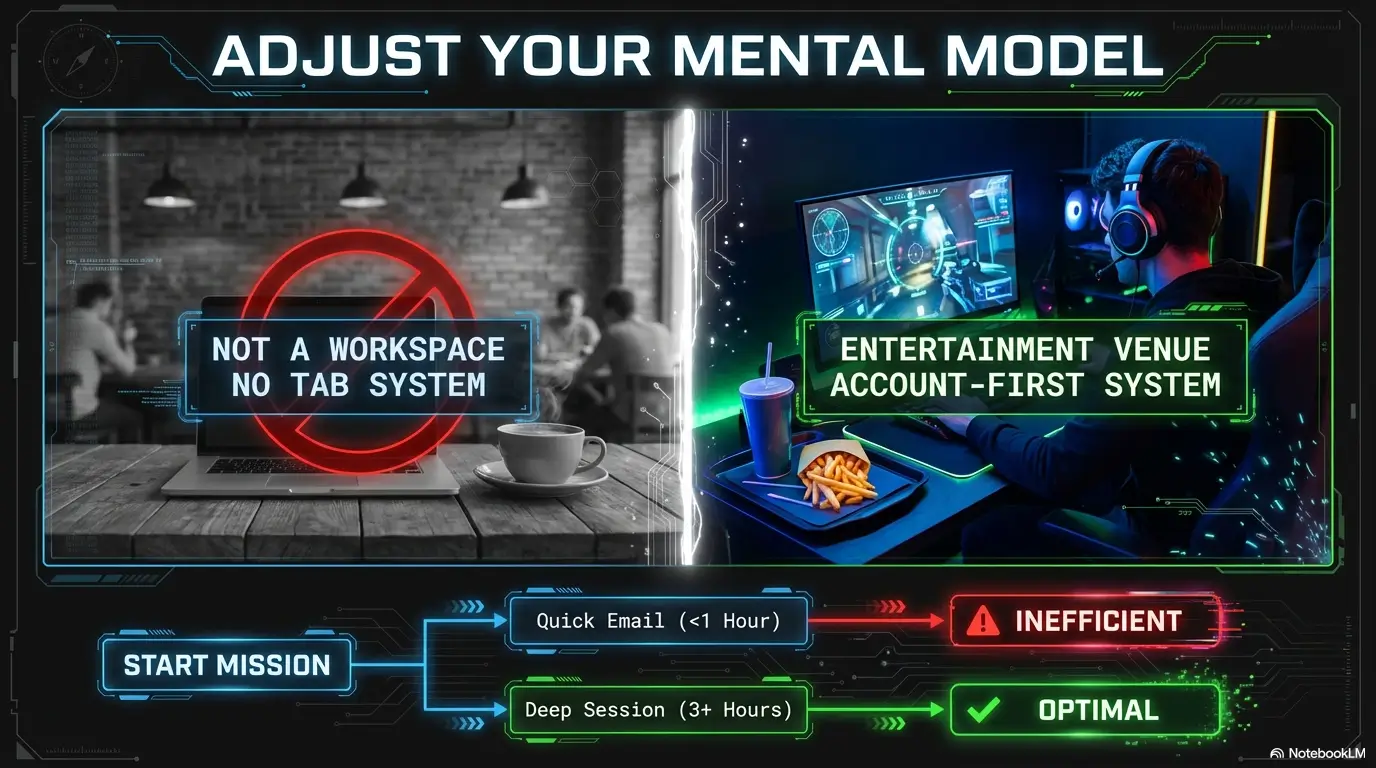
Not for: Anyone expecting US-style “open tab” billing or self-serve seating without check-in
Most places won’t love “I’ll figure it out later.” The system is usually account-first, seat-second. Treat the counter like airport security: it’s not optional, and it doesn’t care that you’re jet-lagged.
- PC bangs are structured: account, time plan, then seat.
- Noise and food are part of the package.
- Staff can help fast if you approach correctly (think Korean indirect communication: calm, brief, and clear).
Apply in 60 seconds: Before you enter, decide: “Am I here for 2–3 hours or an all-nighter?”
First 2 minutes: the check-in flow that decides your whole night
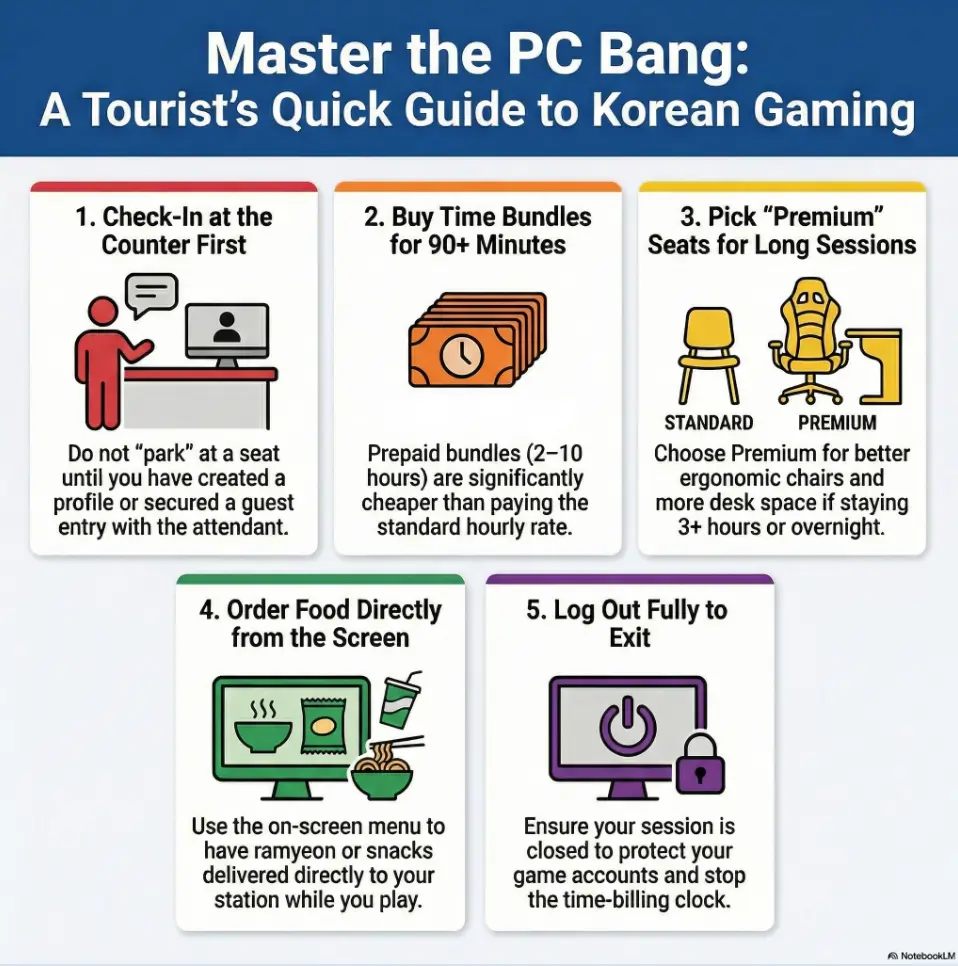
Step 1: Find the counter (it’s the gatekeeper, not decoration)
The counter is where you “become a person” in the PC bang’s universe. No counter interaction usually means: you can’t load time, can’t order food smoothly, and may not be able to log in at all. A lot of foreigners lose confidence right here because it feels like you’re interrupting someone. You’re not. This is literally their job.
Personal note: the first time I walked into a PC bang, the attendant looked up with the calm expression of someone who has watched thousands of humans do the same awkward dance. I pointed at myself, pointed at the computers, and said “PC bang… yes?” It was not my finest script, but it worked.
Step 2: Membership vs “one-time” entry (what staff usually asks)
Many PC bangs use a membership/account system, even for one-time visitors. Don’t panic. “Membership” often just means “we need to create a profile so we can track your time balance.” Some places can do a quick temporary account. Others want a phone number (Korean is common, but not always required).
Step 3: Seat assignment vs pick-any-seat (how to tell which system you’re in)
Two common styles:
- Assigned seat: the attendant gives you a seat number, sometimes printed or shown on a screen.
- Pick any open seat: you register first, then choose an available station (often obvious by empty chairs and screens).
If you see a wall display with seat numbers or a “seat map” on a monitor near the desk, assignment is likely. If the attendant gestures vaguely at the room after you register, it’s usually pick-any-seat.
Micro: Let’s be honest… your first mistake is sitting before you’re registered
I’ve watched this happen: someone sits down, tries to launch a game, then realizes the PC is locked to an account screen. They stand up, wander to the counter, then come back and find someone else in the seat. It’s a tiny tragedy with fluorescent lighting.
- Staff expects newcomers, even at midnight.
- Seat systems vary: watch for a seat map.
- Don’t “park” yourself until you’re registered.
Apply in 60 seconds: Walk in, make eye contact at the counter, and hold up 1 finger to signal “one person.”
Sign-up & membership: what they actually need from you (and what they don’t)
Phone number, ID, or neither? (the 3 common scenarios)
You’ll usually fall into one of these:
- Scenario A: Phone number only. They type it in, create your account, done.
- Scenario B: Phone number + quick info. Name/nickname, sometimes birth year (not always).
- Scenario C: Minimal/guest flow. Some places can do a temporary entry without much data.
If you have a Korean number (exchange student, long-stay visitor, or eSIM number that works for calls/SMS), life is smooth. If not, you’re not doomed, you just need a plan.
“I don’t have a Korean number” workaround playbook (tourist-friendly options)
Here are realistic options that don’t require theatrics:
- Ask for guest/temporary entry with simple English and a polite tone. (If you want the cultural “polite without being stiff” vibe, borrow a few cues from Korean honorifics for tourists.)
- Go where tourists go: PC bangs near universities, major subway hubs, or popular neighborhoods often handle foreigners more smoothly.
- Visit earlier in the evening (not 3 a.m.) if you want more patient communication and fewer “please just pick a seat” gestures.
Personal note: I once tried to explain “I have no Korean number” using only my hands and an apologetic smile. The attendant solved it in five seconds by creating a quick entry profile. Moral: ask simply, then stop over-explaining.
Account basics: username, time balance, and why it matters for food ordering
Your account is your wallet and your timer. Load time, spend time, sometimes pay for food through the same system. Even if you pay food separately at the counter, your account is still the thing that “authorizes” you to order to your seat.
Curiosity gap: Why some PC bangs “recognize” you instantly next time
Regulars often check in by phone number. The system pulls their profile instantly, remembers preferences, and sometimes shows their remaining balance if they’ve been there recently. It can feel like the place has a memory. It’s not magic. It’s just Korean efficiency with a gamer skin.
Money Block: Eligibility checklist (tourist-friendly PC bang)
- Yes/No: Is there a staffed counter visible from the entrance?
- Yes/No: Do recent reviews mention “clean,” “friendly,” or “helpful” staff?
- Yes/No: Are prices displayed clearly (board, screen, or poster)?
- Yes/No: Does it look bright and maintained (chairs not shredded, keyboards not sticky)?
Next step: If you answered “no” to two or more, pick a different PC bang nearby.
Rates & time plans: decoding the pricing board without guessing
The core model: hourly rate vs prepaid bundles (what’s cheaper, when)
Most PC bangs make you choose between:
- Pay-by-hour (simple, flexible, often slightly pricier per hour)
- Prepaid bundles (1–10+ hours, usually cheaper per hour)
Decision rule: if you’re staying longer than 90 minutes, a bundle is often the safer bet. If you’re just waiting for friends or killing 45 minutes before a meetup, hourly can be less mental math.
Peak vs off-peak pricing (the late-night math)
Some PC bangs have pricing that changes by time of day. Late-night can be a bargain if they’re trying to keep seats filled. Or it can be peak if you’re in an area packed with night owls. The important part is not guessing. Look for words like “event,” “night,” “weekday/weekend,” or time ranges on the board.
Personal note: once I bought a 2-hour plan thinking I’d “probably leave soon.” Two hours later, I was ordering fries and negotiating with myself like a hostage negotiator. I should have bought the 5-hour plan. My wallet still remembers.
“Time plans” that include perks (drinks, snacks, seat tiers)
Some plans bundle perks: a drink, a snack, or access to premium seats. Don’t treat these like airline upgrades. Treat them like a convenience fee. If the premium seats matter for comfort (more space, better chair, slightly quieter corner), it can be worth it on an all-nighter.
Curiosity gap: The small print that quietly changes your final cost
Two quiet cost-changers:
- Seat tier: Premium seats may cost more per hour or require a specific plan.
- Auto-extension: Some systems keep charging time if you don’t log out properly.
You don’t need to fear this. You just need a leaving habit: log out, stand up, and confirm remaining time if you’re unsure.
Show me the nerdy details
Pricing systems usually track time by account session, not by “how long you physically sit.” That’s why logging out matters. Some venues deduct time in small increments (e.g., minutes), while others may round in ways that favor bundles. Also, premium seats are sometimes managed as a separate “zone” with its own per-hour rate, which is why the attendant may ask which area you want before adding time.
Money Block: Fee/Rate table (typical structure, ranges vary by venue)
| Plan type | Best for | What to watch |
|---|---|---|
| Hourly | Short stays (30–90 min) | Rounding, peak hours |
| 2–5 hour bundle | Most first-timers | Seat tier differences |
| 10+ hour / overnight block | All-nighters, study sessions | Comfort, breaks, time cutoffs |
Next step: Pick your plan based on how long you’ll actually stay, not how long you wish you’ll stay.
Seat types & setup: why your game feels different at a PC bang
Standard vs premium seats (and what “premium” really buys you)
Premium usually means one (or more) of these:
- More desk space (good for drinks + mouse movement)
- Better chair (your back will send thank-you letters)
- Slight separation (less shoulder bumping)
- Sometimes better monitor or peripherals
If you’re doing an all-nighter, premium can be less “luxury” and more “injury prevention.” I once chose standard for a long session to save money and woke up the next day shaped like a question mark.
Headsets, keyboards, and the “don’t touch that” rules
Most stations have:
- Shared headset (sometimes hanging, sometimes in a cubby)
- Keyboard and mouse set by the venue
- PC configured with a standard image (settings they don’t want you to change)
Avoid changing system settings, installing random software, or “optimizing” things. The fastest way to get staff involved in the wrong way is to treat the PC like your personal rig.
Accounts & launchers: Steam, Riot, Battle.net (what’s easy, what’s not)
Many PC bangs are set up for popular games and platforms, but login flow can still be the slowest part. In practice:
- Easy: launching games already installed and updated
- Sometimes annoying: two-factor prompts when your phone is asleep, roaming, or slow on Wi-Fi
- Most annoying: forgetting to log out on a shared machine (more on that later)
Pattern interrupt H3: Here’s what no one tells you… the real bottleneck is often logins, not hardware
The PC can be a rocket ship. You can still waste 15 minutes finding passwords, waiting for 2FA, and realizing your authenticator app is tied to a number that doesn’t currently get texts. My “operator habit” is simple: log into your accounts once, confirm you can log out fast, then relax.
Money Block: Decision card (Standard vs Premium)
Choose Standard
- You’re staying under 2 hours
- You don’t mind tighter space
- You’re mostly browsing / short gaming
Choose Premium
- You’re doing 3+ hours or overnight
- You want more elbow room
- Your neck/back is already cranky
Next step: If you’ll be there past midnight, pick comfort over bravado.
Food ordering at your PC: the menu system, payment, and delivery etiquette
How ordering works (screen menu vs app vs counter)
Food ordering is half the reason PC bang culture feels uniquely Korean. Common methods:
- On-screen menu: you order from the PC interface at your station.
- Counter order: you tell staff what you want, then they deliver or call you.
- Hybrid: you order at the PC, but payment is handled at the desk.
The first time I ordered, I clicked something I didn’t understand and accidentally requested two drinks. The attendant delivered them with zero judgment, which somehow made me feel more judged.
Most-ordered staples: ramyeon, 떡볶이, fried snacks, rice bowls, drinks
If you want the “PC bang starter pack,” it’s usually:
- Ramyeon (hot noodles that taste like late-night victory)
- Fried snacks (fries, nuggets, fried dumplings)
- Tteokbokki (spicy rice cakes that can sneak up on you)
- Rice bowls (simple, filling, good for long sessions)
- Drinks (soda, coffee, sometimes energy drinks)
Delivery to your seat: trays, pickup cues, and where to place empties
Delivery etiquette is simple:
- Make space on your desk before the tray arrives.
- Accept the tray with a small “thank you” (a nod is fine).
- Put empties where the venue expects them (often a designated spot on or near your station).
If you’re unsure, watch a regular for 10 seconds. PC bangs are social learning labs, and locals are your silent teachers.
Curiosity gap: Why the food is good enough to be the whole reason you go
Because the business model rewards you staying longer. If the food is decent, you don’t leave. If you don’t leave, you buy more time. It’s not romance. It’s incentives. And sometimes incentives taste like spicy noodles at 2 a.m.
Money Block: Mini calculator (pick a time plan without regret)
Input 1: How many hours will you realistically stay? (be honest)
Input 2: Are you ordering food? (Yes/No)
Input 3: Is comfort important tonight? (Yes/No)
Output: If staying 2+ hours, choose a bundle. If ordering food and staying late, consider premium seating so the desk doesn’t become a Tetris board. If you’re leaving within 60–90 minutes, hourly is fine.
Next step: Decide your “realistic hours” before you talk to the counter.
Overnight “all-nighter” culture: what happens after midnight
Why people stay: tournaments, teams, study sessions, and “last train” logic
The overnight crowd isn’t one type of person. You’ll see:
- Gamers on a mission (ranked climb, team practice, tournaments)
- Students who want a “focused bubble” with snacks and zero chores
- Last-train survivors who missed transit and decided to make it a night
- Travelers who want a cheap, warm place to pass time (not always recommended, but it happens)
Personal note: I once ended up in a PC bang because it was raining sideways and I had 90 minutes to kill before my friend got off work. That “90 minutes” became five hours, a bowl of ramyeon, and a new respect for ergonomic chairs.
Overnight bundles and how they’re structured (time blocks + discounts)
Overnight plans are often sold as blocks: “night pack,” “overnight event,” or a large hour bundle that’s cheaper per hour. The exact shape changes by venue. What stays consistent: the longer you commit, the more they reward you.
Safety + comfort basics: hydration, posture, breaks, and personal items
This is low-risk travel etiquette, but your body still has opinions. Bring (or do):
- Water (or order it) and drink it before you feel thirsty.
- Micro-breaks every hour: stand up, roll shoulders, blink like a human.
- Personal items: charger, small hand sanitizer, maybe a light layer if you run cold.
Micro: Quick reality check: it’s fun until your neck becomes a question mark
All-nighters are a vibe until the morning light hits and your spine sends you a strongly worded email. If you plan to stay late, choose comfort and schedule breaks like they’re part of the game.
- Night packs exist because people actually stay.
- Comfort choices pay off after hour 3.
- Hydration + breaks prevent next-day misery.
Apply in 60 seconds: Set a phone alarm for a 2-minute stretch every 60 minutes.
Short Story: The night I accidentally joined the all-nighter club (120–180 words) …
I walked into a PC bang at 11:40 p.m. telling myself I’d stay “just until midnight.” The place smelled like fries and warm electronics, the chairs looked like spaceship seats, and the room had that quiet intensity you only get when everyone is focused on something that matters to them. I bought a small time plan, sat down, and immediately spent ten minutes wrestling with logins, because my phone decided it was the perfect time to lose signal.
A regular next to me leaned over, pointed at the counter, and said one word that sounded like “help.” The attendant fixed it in seconds. Around 1 a.m., I ordered ramyeon. Around 2 a.m., I promised I’d leave after “one more match.” At 4 a.m., I stepped outside and realized the city was still awake, just in a different key. I didn’t feel cool. I felt oddly calm.
Etiquette & social rules: the unspoken code (so you don’t become a story)
Volume, chair space, and “don’t hover” seat behavior
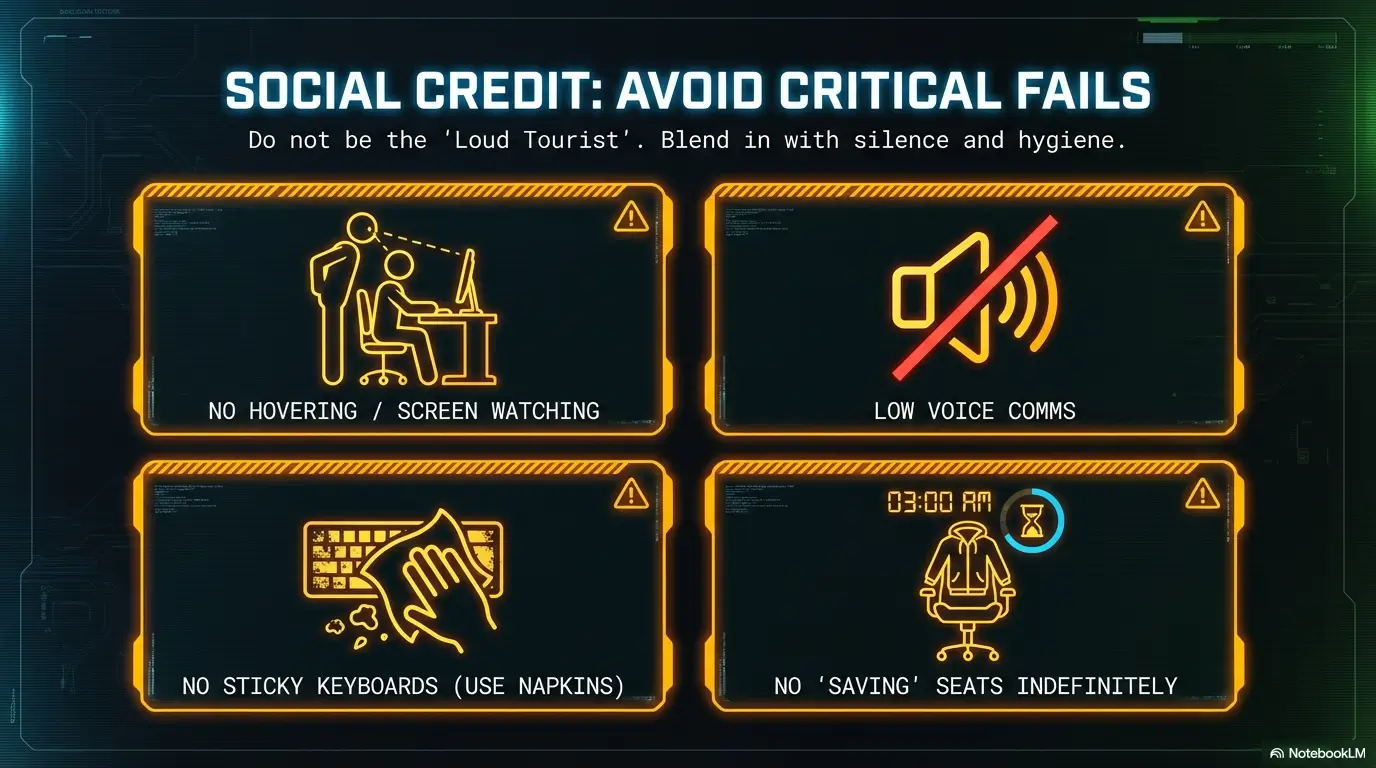
PC bangs are shared spaces with a strong “don’t bother strangers” vibe. Basics:
- Keep voice low unless you’re in a group and it’s clearly acceptable.
- Respect chair boundaries; don’t sprawl into someone else’s space.
- Don’t hover behind someone watching their screen like it’s a museum exhibit.
Personal note: I once stood too close behind my friend while he was paying at the counter. The attendant didn’t scold me. They simply paused, looked at me, and the message arrived fully formed: “Back up.” I backed up.
Cleanliness: keyboards, hands, and food boundaries
Shared peripherals + food equals one simple rule: don’t be the sticky legend. Use napkins, keep sauces under control, and wash or sanitize hands before you touch everything again. It’s not about being precious. It’s about being decent.
Smoking rules, designated areas, and local variations
Some PC bangs have separate smoking rooms or designated zones. Some are stricter. Don’t assume. If you vape or smoke, look for signage or ask at the counter. The unspoken rule is: don’t make your habit someone else’s air.
Respecting staff: the fastest way to get help (and the fastest way not to)
Staff can fix problems fast, but the tone matters. Polite + simple beats loud + complicated. If something isn’t working, don’t slam keys like you’re in a movie. Walk to the counter, show the screen, and let them do their job. (If you want a lightweight “polite-but-natural” shortcut, see Korean honorifics for foreigners.)
Money Block: Coverage tier map (etiquette that changes from Tier 1→5)
| Tier | What it covers | Your behavior |
|---|---|---|
| 1 | Basic quiet + personal space | Low voice, no hovering |
| 2 | Food + cleanliness | Napkins, tidy desk, empties placed correctly |
| 3 | Shared equipment respect | No system tweaks, no installs |
| 4 | Staff interaction norms | Show screen, ask briefly, thank them |
| 5 | Overnight stamina etiquette | Breaks, quiet, don’t sprawl like you live there |
Next step: Aim for Tier 2 behavior at minimum on your first visit.
Common mistakes: the fastest ways to waste money or time
Mistake #1: Sitting down first, then realizing you can’t log in
This is the classic. It feels harmless. It isn’t. If a place is busy, your seat can disappear while you’re back at the counter. Counter first. Always.
Mistake #2: Buying the wrong time plan (and paying peak prices accidentally)
If you’re hungry, tired, or excited, you’ll underestimate your stay. Then you’ll top up again and again. Bundles often exist for a reason. Do one honest estimate before you pay. Your future self will clap quietly.
Mistake #3: Ordering food before your account is set (payment hiccups)
Some systems require your account to be active at your seat for orders to route correctly. If the order button doesn’t work, don’t panic-click. Ask staff or order at the counter once, then learn the system.
Mistake #4: Assuming your US accounts will “just work” on shared PCs
Most will work, but the friction comes from security steps and logouts. If you use Steam, Riot, or Battle.net, be ready for authenticators and take your logout seriously. Shared computers are not your living room.
- Most wasted minutes happen before your first match.
- Bundles prevent repeated top-ups and decision fatigue.
- Account security is part of the experience on shared PCs.
Apply in 60 seconds: Before sitting, confirm: “I’m registered, I have time loaded, I know how to log out.”
Don’t do this: avoidable screwups that locals quietly judge
Don’t leave your seat “claimed” without knowing the venue’s rule
Some places tolerate short breaks. Some don’t. Don’t assume you can drape a jacket on a chair like it’s a beach towel and expect it to mean “reserved.” If you need the restroom, go quickly. If you’re leaving for a long time, log out or ask staff what’s normal.
Don’t install random software or change system settings
This is a shared environment. If you start downloading unknown programs, changing settings, or “fixing lag” by tinkering, you’ll either break something or look suspicious. Neither is the vibe you want on vacation.
Don’t ignore breaks during an all-nighter (fatigue makes you sloppy and cranky)
Fatigue makes everything worse: your posture, your mood, your gameplay, your ability to be polite. I’ve seen friends go from cheerful to feral around hour 6. Set breaks. Eat something real-ish. Your future self deserves kindness.
Don’t treat the staff counter like a suggestion
If the rules say “check in,” check in. If the staff tells you a seat is assigned, don’t negotiate. This isn’t a debate club. This is a time-based system with a queue behind you.
First-timer scripts: exact phrases that get you unstuck fast
At the counter: “One person, how do I sign up?” (simple English + gesture-friendly approach)
Try:
- “Hi. One person. First time.” (hold up one finger)
- “How do I sign up?” (point gently to the counter computer)
- “I don’t have a Korean phone number.” (shake head lightly; keep it calm)
Time plan: “What’s the cheapest plan for 3 hours?”
Try:
- “Three hours. Cheapest plan?”
- “Is there a bundle?” (point at pricing board)
Food: “How do I order food to my seat?”
Try:
- “Food order… on screen?” (point to monitor)
- “Can I order at the counter?”
Leaving: “Can you check my remaining time?”
Try:
- “Can you check my remaining time?”
- “I want to log out.” (if you’re unsure what to do on the PC)
Personal note: the “leaving” script is underrated. The first time I left a PC bang, I simply stood up and walked out. Later, I realized I’d left my session running for a bit. It wasn’t catastrophic, but it was avoidable. Now I treat logout like locking my door.
FAQ
Do I need a membership to use a PC bang in Korea?
Often, you’ll need an account profile, but that “membership” can be quick and informal. Many places can create a basic account in minutes so your time balance and seat session are tracked properly.
Can tourists use a PC bang without a Korean phone number?
Sometimes, yes, depending on the venue. Ask at the counter for a guest or temporary option. PC bangs in tourist-heavy areas and near universities are more likely to have a smooth workaround.
How much does a PC bang cost per hour in Korea?
Pricing varies by neighborhood, seat tier, and time of day. The reliable move is to read the pricing board and choose a bundle if you’ll stay longer than about 90 minutes. If you’re unsure, ask “cheapest plan for 2 or 3 hours.”
What are “time plans” and are they cheaper than hourly?
“Time plans” are prepaid bundles (like 2, 5, or 10+ hours) that usually reduce the per-hour cost. They also reduce decision fatigue, because you’re not topping up repeatedly.
Can I log into my Steam/Epic/Riot accounts safely on a PC bang computer?
You can, but treat it like a shared environment: enable two-factor authentication, avoid saving passwords in the browser, and log out fully when you leave. If you’re extra cautious, use app-based authenticators and keep your phone in hand during login and logout.
How do you order food at a PC bang and how is it paid?
Many PC bangs let you order from an on-screen menu at your station, and staff delivers to your seat. Payment can be handled through your account balance or at the counter depending on the venue.
Is it normal to stay overnight at a PC bang?
It’s common enough that many places offer “night packs” or larger bundles designed for long sessions. People do it for gaming, studying, or because they missed late transit. Comfort and breaks matter if you stay long.
Are PC bangs safe for solo travelers?
Generally, they’re public, staffed spaces. Choose a well-reviewed venue, keep valuables close, and avoid leaving items unattended. If something feels off, trust that instinct and switch locations.
What should I bring for an all-nighter at a PC bang?
Phone charger, water or money to buy it, a light layer if you get cold, and a small hygiene item (hand sanitizer, tissues). The secret weapon is also a plan to take micro-breaks.
What etiquette mistakes do foreigners make most often at PC bangs?
Sitting before registering, being too loud, leaving a mess, hovering behind players, and not logging out properly. If you handle the counter flow and keep your space tidy, you’ll blend in instantly. (That “don’t hover / don’t pry” instinct overlaps with Korean personal questions etiquette, too.)
Next step: one concrete action
Open Google Maps and search “PC bang near me”, then choose one with recent reviews mentioning “English-friendly”, “clean”, and “food menu”. Screenshot the pricing board when you arrive, pick a 2–3 hour plan, and do one food order to learn the system. That single loop teaches you 80% of what you need. If you’re making it a whole night out, pairing it with a “rules of the room” mindset you’d use in Seoul cafe etiquette helps you blend in fast: quiet, tidy, efficient.
1) Counter
Register or guest entry. Load time. Ask about seat system.
2) Seat
Choose assigned or open seat. Confirm you’re logged into the venue session.
3) Login
Game launcher + 2FA. Don’t save passwords. Know how to log out.
4) Food
Order on-screen or at counter. Clear desk space. Return tray/empties properly.
5) Exit
Log out fully. Stand up. Ask remaining time if unsure. Leave clean.
Differentiation map
What competitors usually do
- Generic “What is a PC bang / Benefits / Conclusion” structure
- Vague pricing talk without decision rules for time plans
- Food mentioned as an afterthought, no ordering flow
- Skips the all-nighter logic (pricing, comfort, etiquette)
- No tactical scripts; assumes readers “figure it out”
How this guide avoids it
- Starts with first 2 minutes flow (highest-friction moment)
- Separates modules: membership, time plans, seat tiers, food ordering, overnight culture
- Uses curiosity gaps to keep scrolling without fluff
- Adds mistake framing to prevent wasted money/time
- Gives first-timer scripts and scannable decision blocks
If you remember one thing, make it this: a PC bang isn’t complicated. It’s just unfamiliar. Once you respect the counter flow, choose a time plan like an adult, and treat logout like locking your door, the place becomes what it’s meant to be: a comfortable, efficient little night world. Go try a 2–3 hour plan today, order one snack, and leave clean. You’ll walk out feeling like you learned a small piece of Korea the honest way.
Last reviewed: 2026-02